Plexiform puts a small traffic light on your desktop for every coding-agent session you run: green while it works, amber when it is your turn, red when it is stuck on you. Claude Code first, with Codex, Cursor and Gemini reporting in through hooks. The team board hands cards to agents and shows where each one got to.

Private beta for Mac first. The first open takes a few extra clicks: here's how.

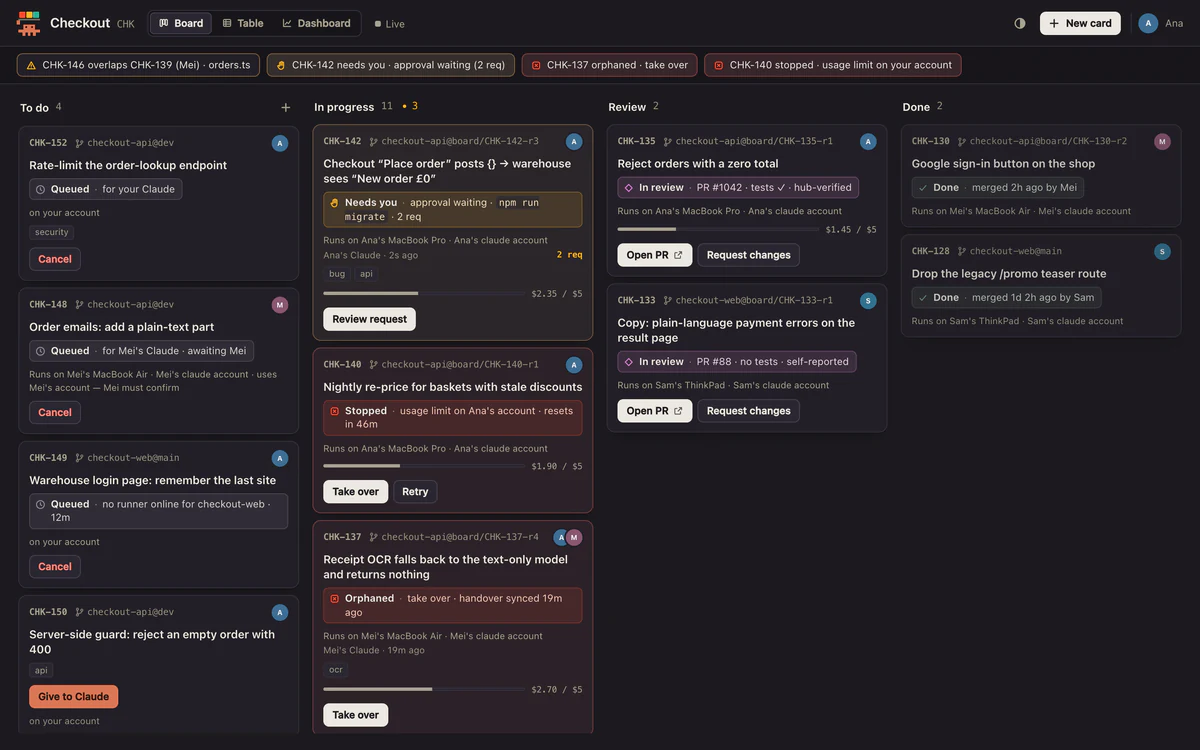
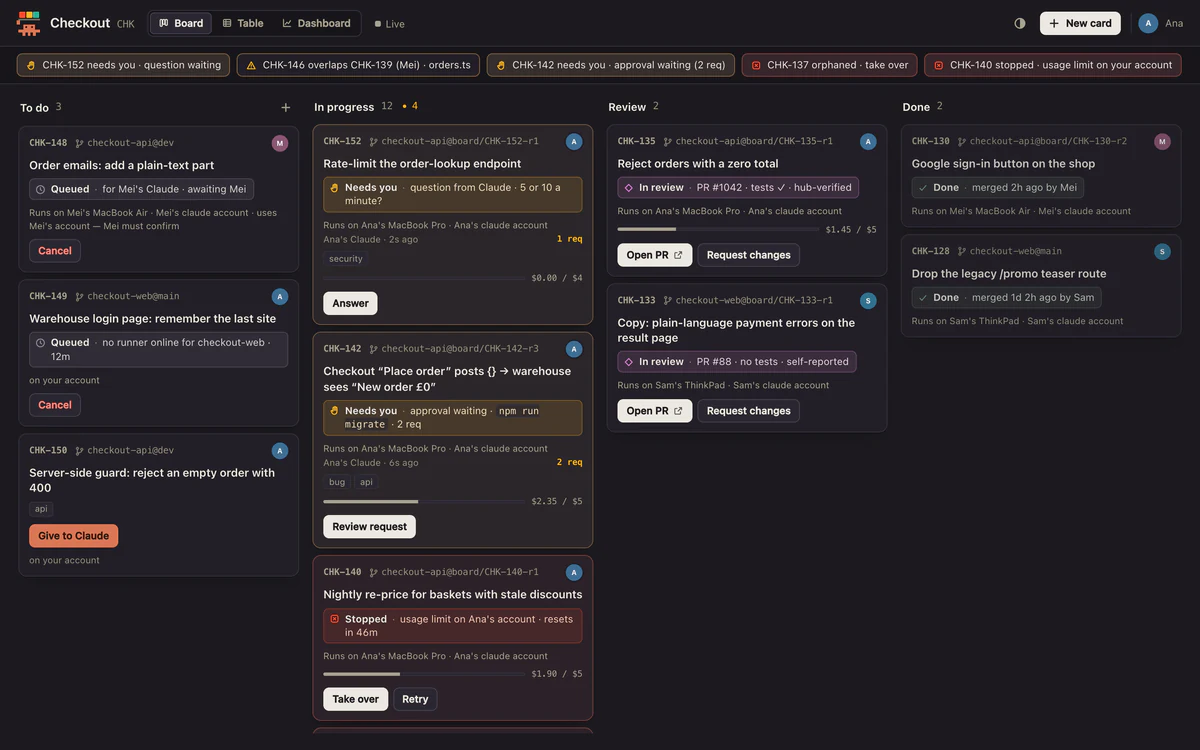
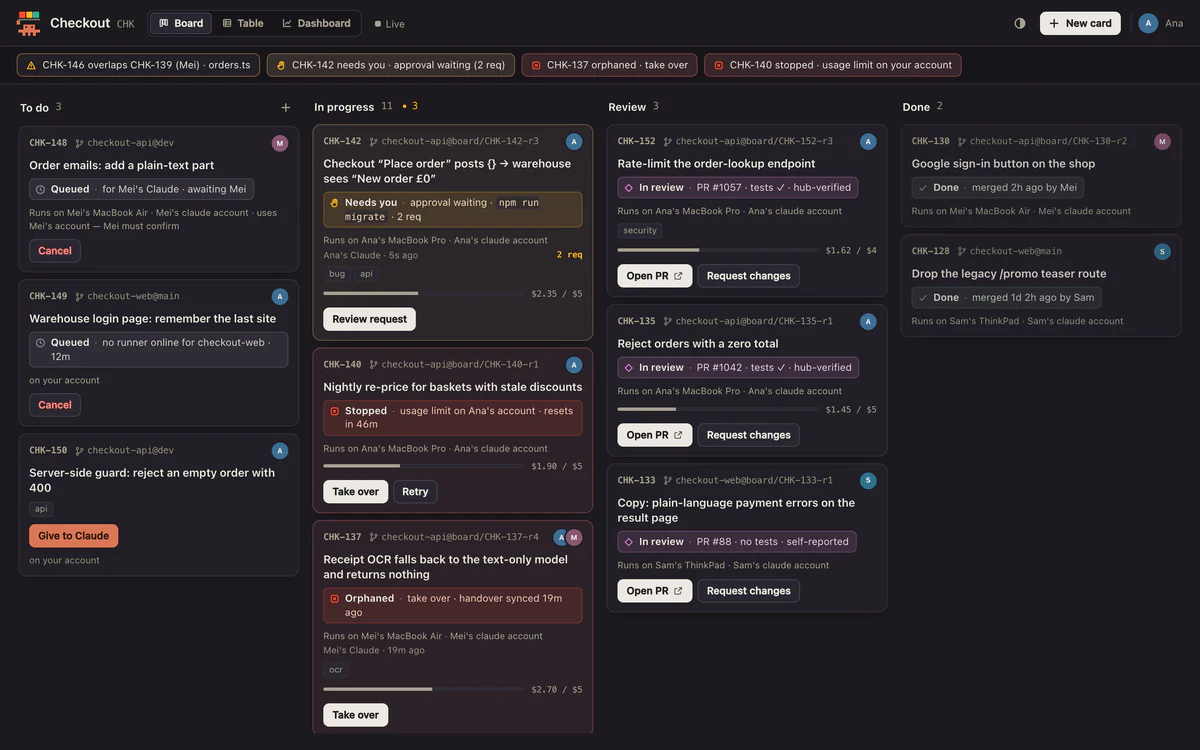
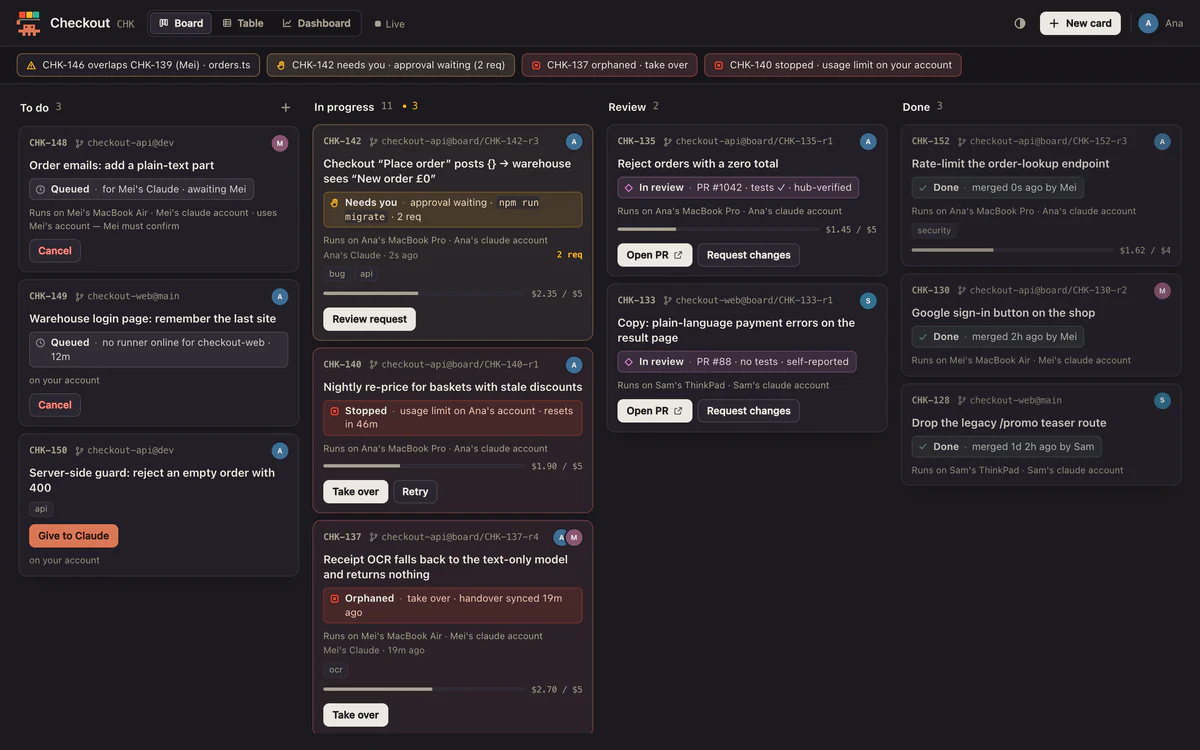
Give a card to an agent and watch it happen.

  1. Press Give to ClaudeOn any card on your team's board. It runs on your machine, in your repo.
  2. Watch the card moveIt goes to In progress the moment the agent starts, and and the card stays in step with the agent.
  3. A question never hides in a terminalWhen the agent needs you, the card says so, and the widget turns red.
  4. Amber means your turnWhen it finishes there's a pull request to review and a handover with what it did.

Three lamps tell you what every agent is doing.

You shouldn't have to tab through terminals to find the one that's waiting. Press a lamp to see what the character does.

A team board that lives next to your agents. Beta

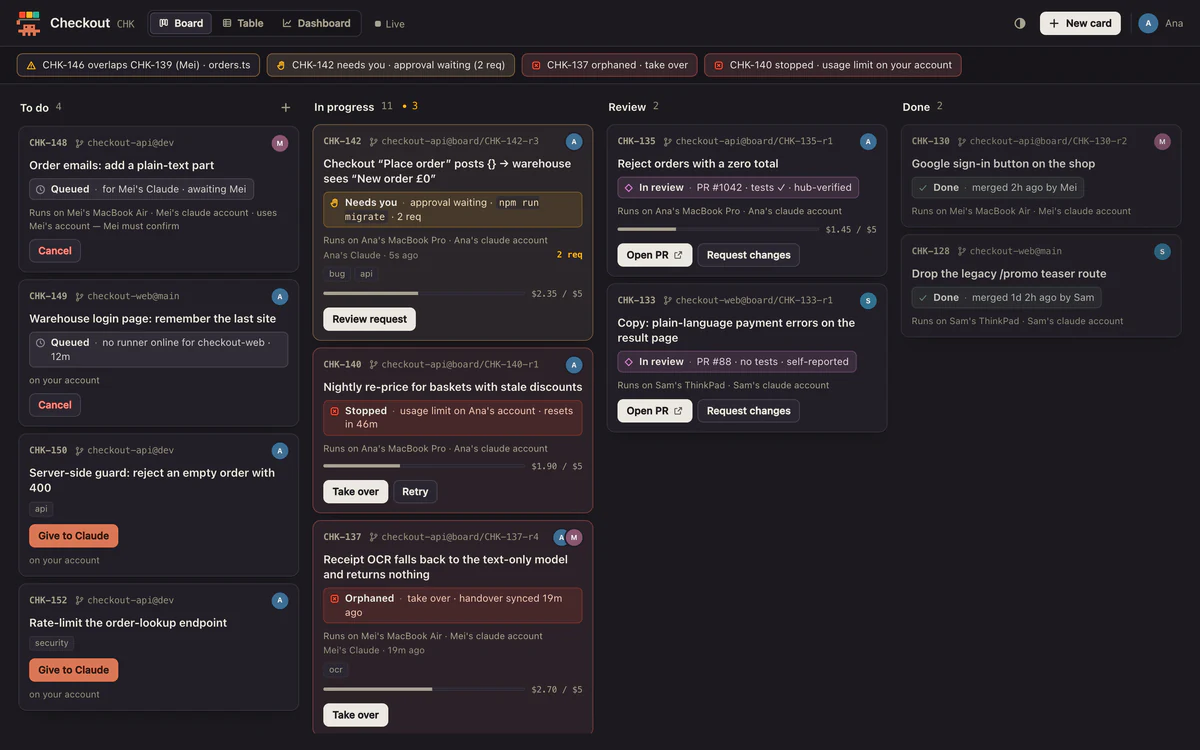
Cards, handovers and run progress sit in the same app as the lamps. When an agent dies mid-run, the card says so, and the handover tells you where it got to.

The board: cards in To do, In progress, Review and Done. Each card shows who is running it, what it needs, and what it costs. A card's handover: the current hypothesis, the plan, what is done, and the files touched, so anyone can pick it up. The table view: every card in a sortable, filterable list. The dashboard: cycle time, cards done per week, who finished the work, where cards wait, and cost per card.

The real board, with sample data for an imaginary shop.

  • Cards run on the assignee's own Mac, in their own repo, with their own Claude or Codex login. Agent runs never go through our servers; the board syncs through your team's hub.
  • Every run keeps a handover: a short narrative, recent actions, and the files and branch involved.
  • A permission prompt never hides in a terminal. Once you turn it on, you can approve or deny it from the widget.
  • Text passes a filter for credential-like strings and home-folder paths before it leaves your machine.

Agents that can talk to each other. Coming

Your Claude can ask a teammate's Claude a question, or hand a finished piece of work to the agent that needs it, through the board, with a human able to read every message.

AnaClaude · reviewing MeiClaude · testing KofiCodex · migrating
  • Ana Claude · reviewing
  • Mei Claude · testing
  • Kofi Codex · migrating

An illustration of how it is planned to work. Not shipped yet.

GitHub today. Slack, Sentry, Linear and Jira next.

GitHub pull requests and builds light the widget today. The rest are on the way. Plexiform is the hub; these are the things it listens to.

Plexiform GitHub Slack Sentry Linear Jira
  • GitHub In the beta
  • Slack Coming
  • Sentry Coming
  • Linear Coming
  • Jira Coming

Solid outline: in the betaDashed outline: coming

One desk for every agent, not just one vendor's.

Claude Code has the deepest support today. Codex, Cursor and Gemini report their state through hooks, and Plexiform turns all of them into the same lamps, so a Codex run and a Claude run look the same from across the room.

It works with the logins you already have. There is no shared key and no account to swap into.

Claude CodeCodexCursorGemini
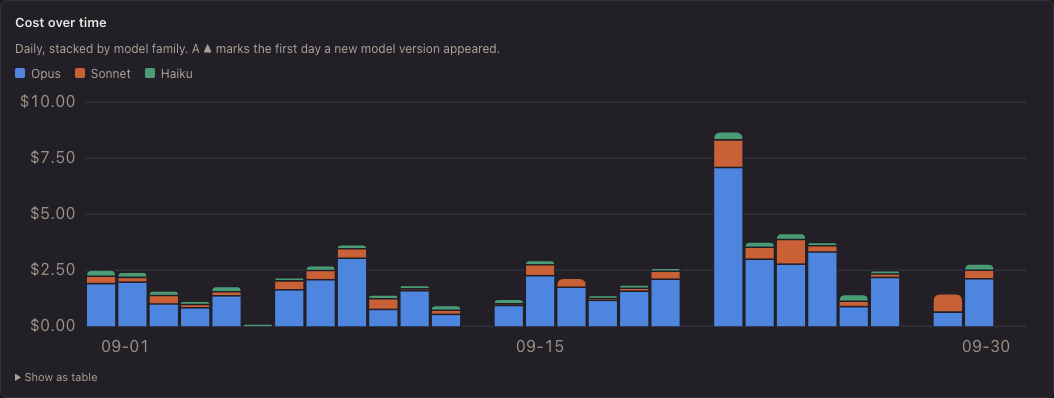
The Usage tab's headline tiles: cost, turns, tokens and cache hit rate, each with its change and a trend line.The Usage tab's cost chart: daily cost stacked by model, with one spike.
The Usage tab in the app, showing sample data.

Know what your agents cost, and where. Beta

Plexiform keeps its own daily record of your usage, so history reaches back past the month of transcripts Claude Code keeps. See spend by model, project and hour; watch cache hit rate; get a nudge when today is well above your usual.

  • Set a daily or weekly budget and a runaway-session alert.
  • On a subscription, amounts are shown as API-equivalent dollars and labelled as not a bill.
  • Anything it can't price is counted and shown as unpriced, never dropped.

A character that's yours.

Buddy comes with friends. Give them costumes, eye moods and poses, or turn into a ghost when you hit a usage limit. Click one. More characters are coming, and so is a way to hatch your own. Hatch: coming

Almost everything stays on your computer.

The app sends no telemetry and no analytics, and the widget needs no account. Your prompts and Claude's replies are never stored by Plexiform, and the conversation logs it reads to count tokens and cost never leave your computer.

Data leaves when you join a team board: your team's hub (run by Plexiform at app.plexiform.dev today) then receives your cards, handovers and run progress, with credential-like text and home-folder paths filtered out first, and signing in to a hub shares your account name and email with it. Sharing what you're working on with teammates is a separate opt-in. Once in-app updates ship, the app also asks download.plexiform.dev for new versions, which, like any download, reveals your IP address and app version. Cloudflare passes our traffic through as our processor.

This summary follows the beta's privacy notice, which is a draft pending legal review. Hub hosting, retention and deletion terms are being written.

Read the privacy notice

  • Voice questions are turned into text on your device and are off by default.
  • Calendar access is off by default, and event titles aren't read unless you turn that on.
  • Crash reports, when they arrive, will be opt-in.
  • Your rules, settings and cameo photos stay in a folder on your Mac.

Private beta, for small teams.

The desktop app works on its own. The team board is where the beta needs you: a few small teams, each with an invite, using it for real work for a few weeks.

Pricing isn't announced yet. The waitlist hears first, before anything is charged.

  • Install it today on a Mac. Windows and Linux builds appear on the download page as they're published.
  • A phone companion, to approve a permission prompt when you're away from your desk, is coming.
  • Every change is written up in the changelog, and the docs list what it adds to Claude Code's settings.

Questions people ask first

Which agents does it work with?

Claude Code, Codex, Cursor and Gemini report their state through hooks, and Plexiform turns each into the same lamps. Claude Code has the deepest support today.

Does it read my prompts or my code?

It never stores prompts. It reads Claude Code's conversation logs on your Mac only to count tokens and cost, and keeps the numbers. Code stays in your repo.

What does the app send out?

No telemetry and no analytics. If you join a team board, your team's hub (run by Plexiform) receives what the board needs and your account name and email. Update checks will ask our download server for new versions. Both are described in the privacy notice.

Why does the first open take extra steps?

The beta isn't signed with an Apple Developer ID yet, so macOS asks you to allow it once in System Settings. The steps are on the download page.

Is there a Windows or Linux version?

Builds are being prepared. The download page lists whatever is published right now.

Who is Buddy?

The pixel character who holds up the traffic light.

How do I get in?

You can install the desktop app now. Joining a team board needs an invite: join the waitlist below, and beta spots go to small teams first.

Get a place in the beta.

Tell us where to send your invite. We'll only use your email about the beta.